Humble beginnings
My initial prompt was very vague on purpose, my plan was to let the AI lead the initial decision of geometry to use, I simply suggested the kind of games I would like to make on a tiny world and that the rendering should use Unity’s rendering API directly (no GameObject per cell). The result was a radially projected cube-sphere as shown in the following picture.
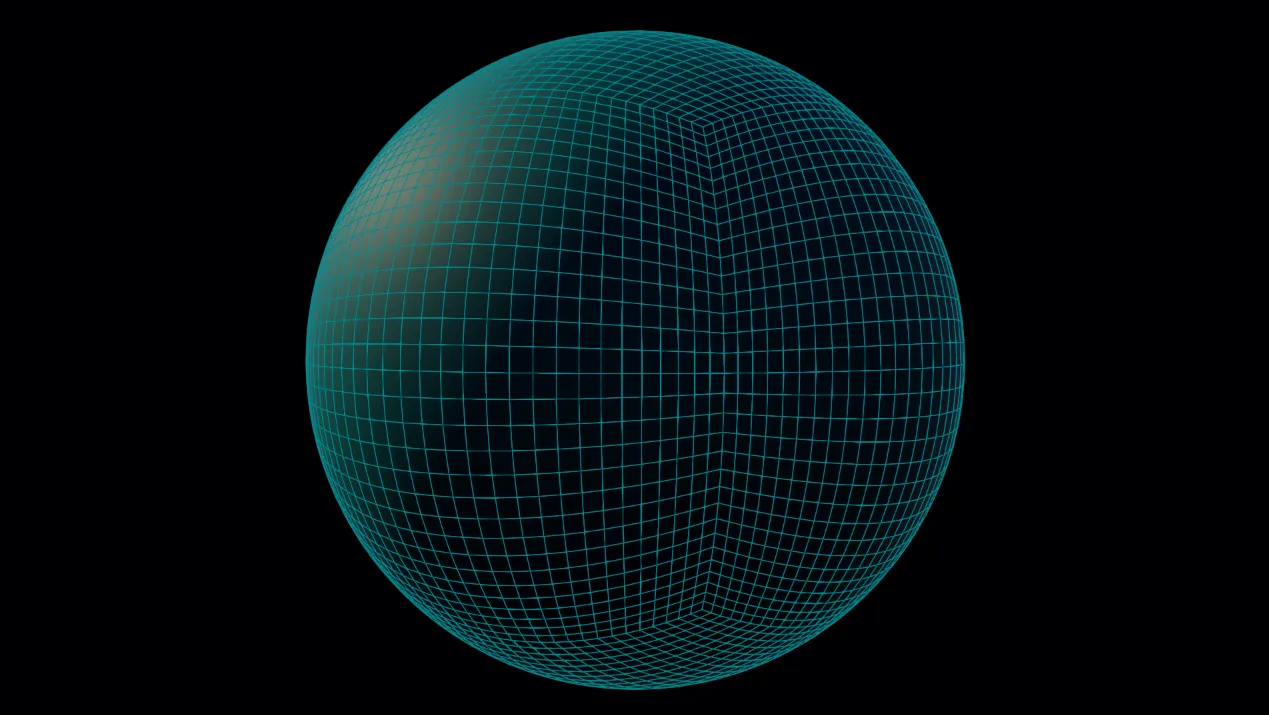
The math behind this was surprisingly simple, calculate the axis of the cube-sphere, start from the center of the sphere, move along the normal of the face, move some steps around the face axis based on the current x, y and resolution and then normalize it. That is the direction of the target vertex. Now simply multiply by the sphere radius and you have all faces split up in a grid and the vertices in a spherical shape.
public static readonly Vector3[] FaceNormals =
{
  Vector3.right, Vector3.left, Vector3.up,
  Vector3.down, Vector3.forward, Vector3.back
};

...

Vector3 normal = FaceNormals[face];
Vector3 axisU = new Vector3(normal.y, normal.z, normal.x);
Vector3 axisV = Vector3.Cross(normal, axisU);
int stride = resolution + 1;
var vertices = new Vector3[stride * stride];
var normals = new Vector3[vertices.Length];
var uv = new Vector2[vertices.Length];
for (int y = 0; y <= resolution; y++)
for (int x = 0; x <= resolution; x++)
{
  int i = y * stride + x;
  uv[i] = new Vector2((float)x / resolution, (float)y / resolution);
  Vector3 direction = (normal + (uv[i].x * 2 - 1) * axisU + (uv[i].y * 2 - 1) * axisV).normalized;
  vertices[i] = direction * radius;
  // Analytic normals agree across duplicated face-edge vertices.
  normals[i] = direction;
}
At a glance, there is something that bothers me, the grid cells have very different sizes, you can notice it in the picture above, near the edges where the faces meet the size of the cells become smaller, and as you approach the vertex of the cube where three faces meet the square cells are at their smallest size. Although I didn’t explore it, I’m pretty sure there must be a mathematical way of deforming the grid to lessen the difference in sizes, so this is not the biggest issue.
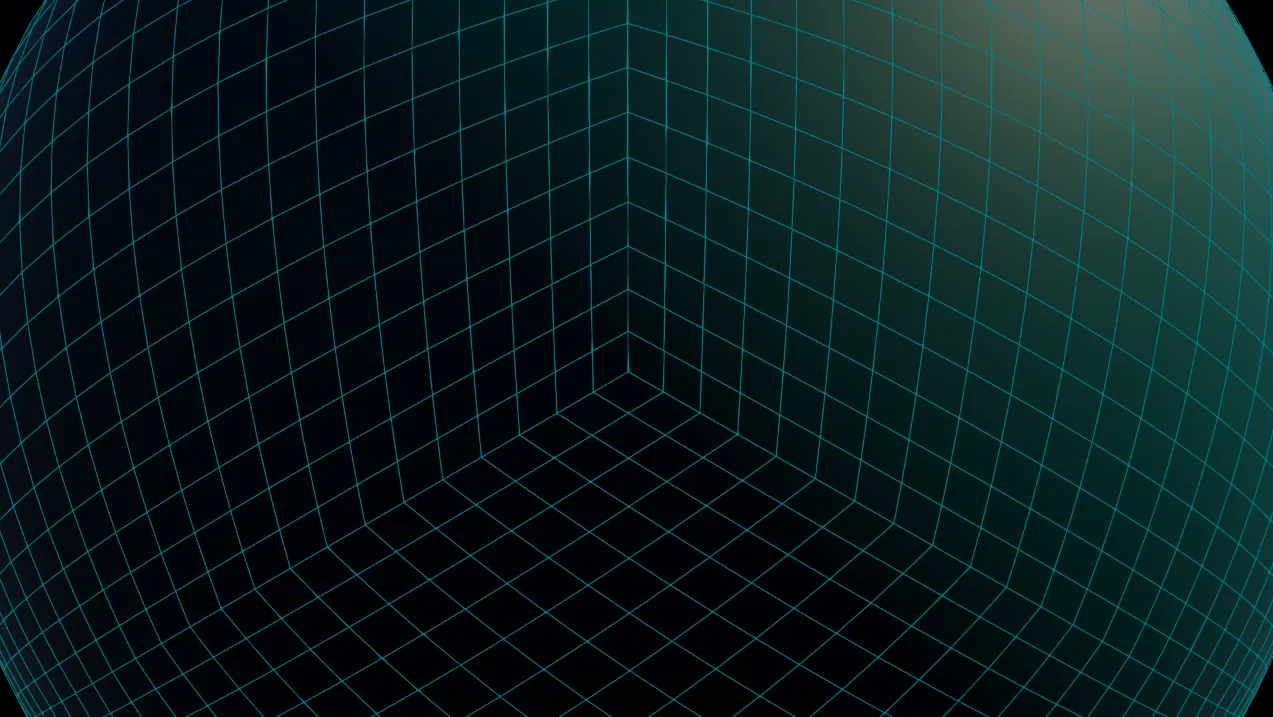
Imagine you are moving from north to south on the left side of the screen. At some point you reach the edge of the cube faces, and now moving down changes its meaning. Do I go down the diagonal of the square? Do I go down to the left or to the right? It’s even worse if you are moving along the edge of the left and right faces, on both moving down will take you to the corner of the bottom face, but then what happens when you move up from there?
I could attempt to keep the logical and the visual representation separated, but I want to keep this simple for now. Given this and based on what I have already seen in other games, I opted to experiment with a hexagonal grid. There is another type of representation that could actually solve this movement issue better than the hexagonal grid, but I will leave that for a future experiment.
Enter the Hexagons (…and pentagons)
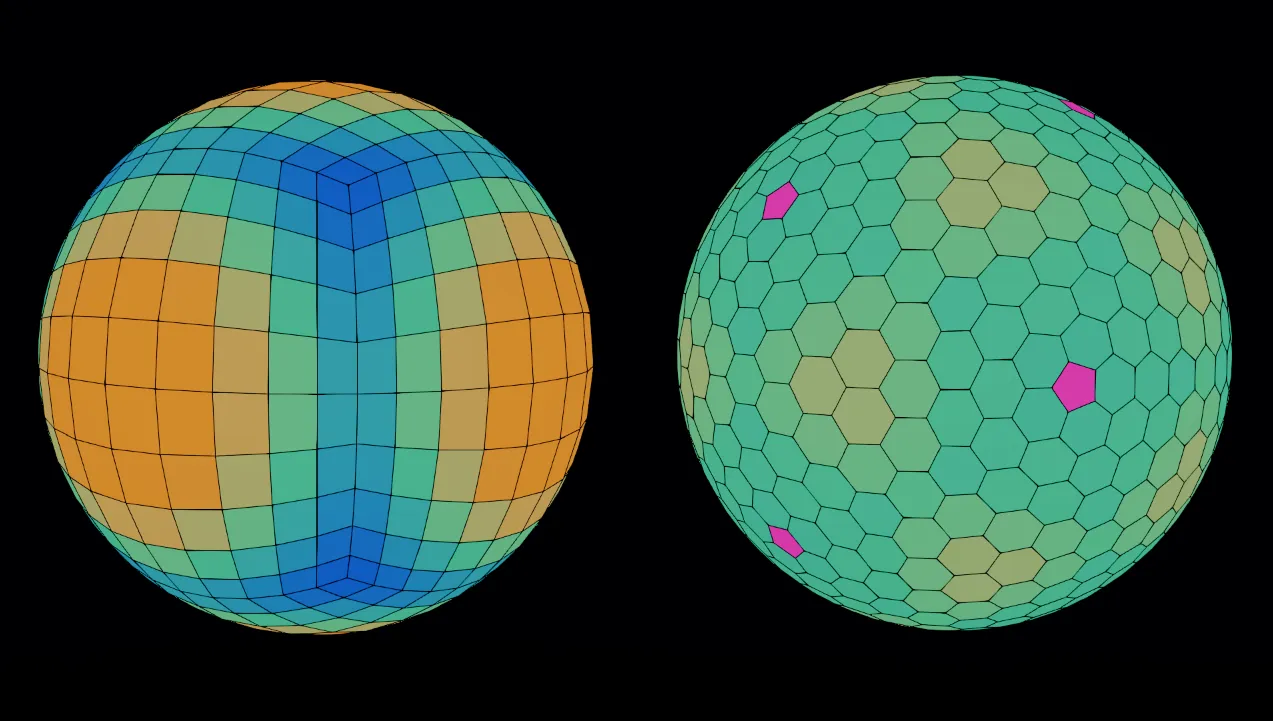
Quickly I learned that it is actually not possible to have only hexagons to shape a spherical volume. Apparently Euler didn’t like that (see Euler’s Polyhedron Formula), the most common solution to this is to add exactly 12 pentagons (that’s what the stereotypical soccer ball does). That’s not too bad, I’m pretty sure we can make it so that it is not so noticeable, and with 12 cells in a big grid we might be able to keep them out of gameplay with some tricks I’m sure. I prompted the AI to create a comparison of the two representations. I was too focused on the difference in sizes of the cells, so the AI made a color scale comparison of that. It’s pretty obvious from the following image, that there are some differences in sizes in the hexagonal grid, but the ratio is much smaller than what happens in the cube-sphere.
Let’s see what the grid generation looks like now. This is a bit more complicated than the previous version so I will explain the algorithm in more detail. It consists of the following steps:
- Build an Icosahedron (a polyhedron with 12 vertices and 20 faces, basically a d20 in D&D). Keep it on the unit sphere.
- Subdivide the triangles up to the desired level of detail. Normalize all vertices so they are on the unit sphere.
- Create the final Polygons: Each vertex we have so far becomes the center (let’s call it ν) of a polygon, the center of each triangle that has ν as a corner becomes a vertex of that polygon. Thus if ν touches 5 triangles the polygon becomes a pentagon, else it touches 6 and it becomes a hexagon.
Let’s start by building the 12 vertices, the theory says that you need to place three mutually perpendicular golden rectangles centered around the origin and connect the twelve corners. So that’s what this code does:
// Golden ratio
float t = (1 + Mathf.Sqrt(5)) / 2;
// Vertices of the three golden rectangles.
var vertices = new List<Vector3>
{
  new Vector3(-1,t,0), new Vector3(1,t,0), new Vector3(-1,-t,0), new Vector3(1,-t,0),
  new Vector3(0,-1,t), new Vector3(0,1,t), new Vector3(0,-1,-t), new Vector3(0,1,-t),
  new Vector3(t,0,-1), new Vector3(t,0,1), new Vector3(-t,0,-1), new Vector3(-t,0,1)
};

// Normalize the vertices to place them on the unit sphere.
for (int i = 0; i < vertices.Count; i++)
  vertices[i] = vertices[i].normalized;

// Triangles of the icosahedron.
var faces = new List<int>(new[]
{
  0,11,5, 0,5,1, 0,1,7, 0,7,10, 0,10,11, 1,5,9, 5,11, 4, 11,10, 2, 10,7,6, 7,1,8,
  3, 9,4, 3,4,2, 3,2,6, 3,6, 8, 3, 8, 9, 4,9,5, 2, 4,11,  6, 2,10,  8,6,7, 9,8,1
});
Now that we have the 20 triangles we subdivide them as much as we want. Every time we subdivide a triangle we create 4 new triangles, so each level of detail multiplies the triangle count by 4 (20 → 80 → 320 → 1280).
The code uses a dictionary to ensure that no duplicated vertices are created, not what I would have done but it is easy enough to understand this way.
for (int level = 0; level < subdivisions; level++)
{
  var next = new List<int>(faces.Count * 4);
  // Dictionary and getter to allow new faces to share the new vertices.
  var midpointIds = new Dictionary<ulong, int>();
  int Midpoint(int a, int b)
  {
    ulong key = EdgeKey(a, b);
    if (midpointIds.TryGetValue(key, out int id)) return id;
    id = vertices.Count;
    // Find the midpoint vertex and add it to the list.
    // Still normalized so that it falls on the unit sphere.
    // (Note: normalize((A + B) / 2) == normalize(a + b)
    vertices.Add((vertices[a] + vertices[b]).normalized);
    midpointIds.Add(key, id);
    return id;
  }
  for (int i = 0; i < faces.Count; i += 3)
  {
    // Get the three vertices of the triangle.
    int a = faces[i], b = faces[i + 1], c = faces[i + 2];
    // Find the midpoints of each edge.
    int ab = Midpoint(a, b), bc = Midpoint(b, c), ca = Midpoint(c, a);
    // Write down the 4 new triangles.
    next.AddRange(new[] {
        a, ab, ca,
        b, bc, ab,
        c, ca, bc,
        ab, bc, ca
    });
  }
  faces = next;
}
Alright, so now the vertex list holds the center of each final polygon, however we now need to find all the corners of each of them. As I mentioned before, the corners of a polygon are the center points of each triangle that has the center of the polygon as a vertex. So we traverse all the triangles, we find their center, and we mark it as a corner for each of the three polygons centered around its vertices.
var centers = new Vector3[faces.Count / 3];
var incident = new List<int>[vertices.Count];
for (int i = 0; i < incident.Length; i++)
  incident[i] = new List<int>(6);
for (int f = 0; f < centers.Length; f++)
{
  int a = faces[f * 3], b = faces[f * 3 + 1], c = faces[f * 3 + 2];
  centers[f] = (vertices[a] + vertices[b] + vertices[c]).normalized;
  incident[a].Add(f); incident[b].Add(f); incident[c].Add(f);
}
Now we have the center and all the corner vertices of each of our polygons, but we need to sort them nicely so that we can make a triangle fan out of them. The center vertices are stored in our vertices list, as these lie on the unit sphere that means they are also the surface normal, this comes in handy as we need to calculate the tangent plane to sort the corners. We project all corners onto the tangent plane. Then we measure the angles of each, sorting them counter-clockwise. After that we just gather all the data necessary to store in a SphereCell struct, this means, the normal (and center vertex), the corners and the uv’s that match the tangent plane coordinates.
var cells = new SphereCell[vertices.Count];
for (int i = 0; i < cells.Length; i++)
{
  Vector3 normal = vertices[i];
  // Find the tangent plane.
  Vector3 u = Vector3.Cross(Mathf.Abs(normal.y) < 0.9f ? Vector3.up : Vector3.right, normal).normalized;
  Vector3 v = Vector3.Cross(normal, u);
  // Place each corner of the polygon on a tangent coordinate system. And compare their angles to sort them counter-clockwise.
  incident[i].Sort((a, b) => Math.Atan2(Vector3.Dot(centers[a], v), Vector3.Dot(centers[a], u))
    .CompareTo(Math.Atan2(Vector3.Dot(centers[b], v), Vector3.Dot(centers[b], u))));
  // Store all that in a Sphere Cell.
  int[] corners = incident[i].ToArray();
  var uv = new Vector2[corners.Length];
  float extent = 0;
  for (int j = 0; j < corners.Length; j++)
  {
    Vector3 p = centers[corners[j]];
    uv[j] = new Vector2(Vector3.Dot(p, u), Vector3.Dot(p, v));
    extent = Mathf.Max(extent, uv[j].magnitude);
  }
  for (int j = 0; j < uv.Length; j++) uv[j] = Vector2.one * 0.5f + uv[j] / (2 * extent);
  cells[i] = new SphereCell { center = normal, corners = corners, uv = uv };
}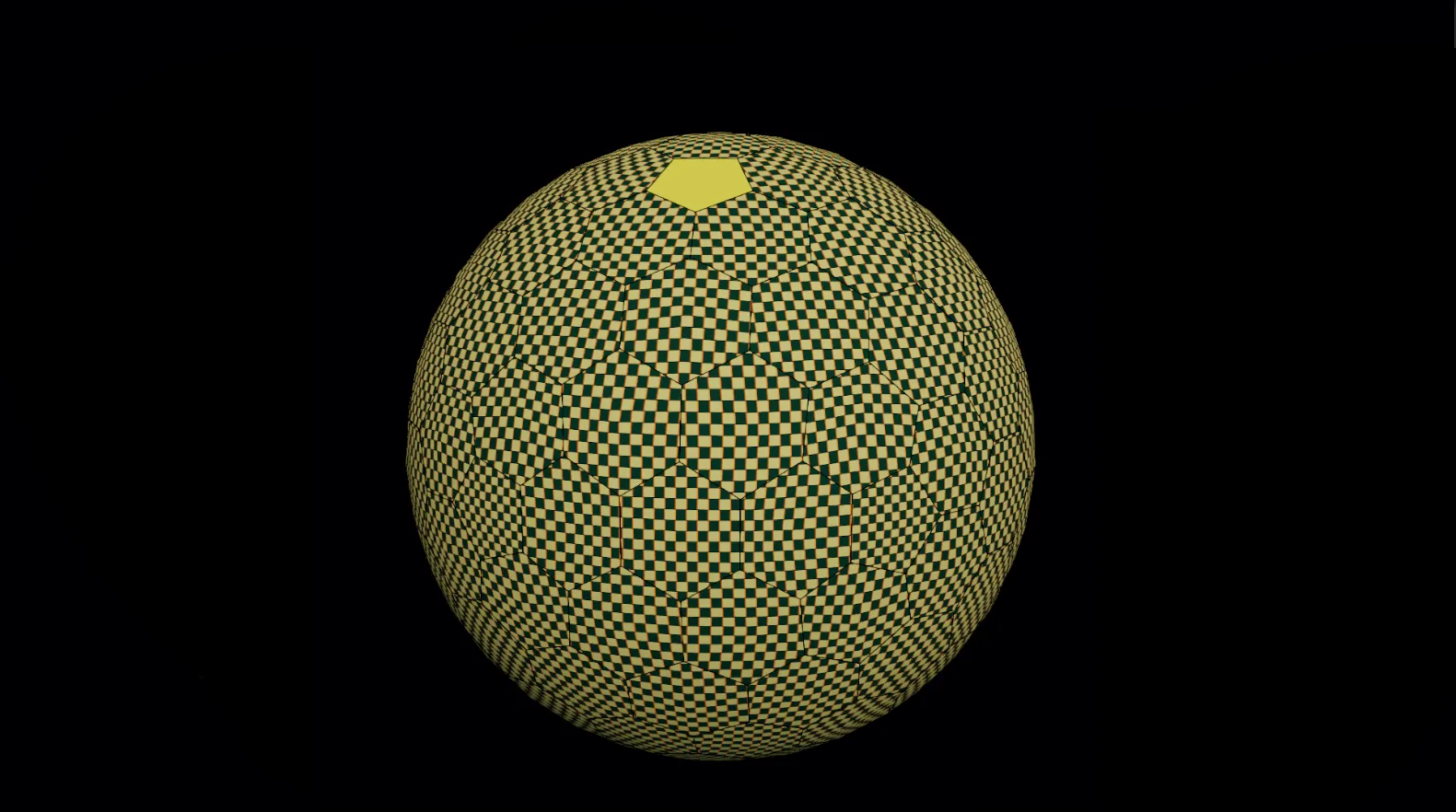
We now have all the cell data required to build a mesh of a mostly hexagonal grid in a spherical shape. But now it’s time to move towards the logical grid and the coordinate system. That’s what the next article will be about.